

Download Physics 101 SE – Interactive Physics Learning Tool for Mac
Overview
Physics 101 SE, crafted by Praeter Software, is a full‑version educational application designed exclusively for macOS. Positioned in the Science category, this tool offers a comprehensive, interactive experience that transforms the way students and enthusiasts approach physics. Instead of relying solely on static textbook diagrams, users can explore a library of dynamic simulations that illustrate fundamental concepts such as Newtonian mechanics, electromagnetism, thermodynamics, and modern physics.
The interface is intentionally user‑friendly: each module is organized into clear lessons, hands‑on virtual labs, and real‑time feedback mechanisms that reinforce learning outcomes. Whether you are a high‑school student preparing for exams, a university undergrad needing supplemental practice, or a lifelong learner curious about the laws governing the universe, Physics 101 SE adapts to your skill level. The program’s design philosophy focuses on accessibility, meaning complex equations are broken down into visual narratives that make abstract ideas tangible.
This approach not only boosts comprehension but also encourages curiosity, prompting users to experiment with variables, observe outcomes, and develop intuition for scientific reasoning. By merging rigorous content with an engaging, click‑through environment, Physics 101 SE stands out as a powerful, secure, and regularly updated learning companion for anyone serious about mastering physics on a Mac.
Key Features
- Interactive 3D simulations covering mechanics, optics, electricity, magnetism, and quantum basics.
- Step‑by‑step guided labs that let you modify parameters and instantly see results.
- Integrated problem sets with automatic grading and detailed solution explanations.
- High‑resolution graphics optimized for Retina displays, ensuring crisp visual feedback.
- Progress tracking dashboard that records achievements, time spent, and mastery levels.
- Offline mode – all content is stored locally after the initial download, allowing study without internet.
- Regular content updates and bug‑fix patches delivered securely via the built‑in updater.
- Cross‑reference glossary linking key terms directly within simulations.
- Exportable reports in PDF/CSV for teachers or self‑assessment documentation.
- Accessibility support: VoiceOver compatibility and adjustable font sizes for inclusive learning.
Each feature has been designed to address common pain points in physics education. The simulations replace cumbersome physical apparatuses, giving users a risk‑free environment to test hypotheses. The problem‑set engine provides immediate, formative feedback, which is essential for reinforcing concepts before moving to more complex topics. Moreover, the progress dashboard encourages gamified learning, rewarding consistent study habits with badges and certificates. The combination of high‑quality visuals and responsive controls ensures that even intricate phenomena—like interference patterns or Lorentz transformations—are rendered clearly, helping users build mental models that translate to real‑world understanding.
Installation & Usage Instructions
Step‑by‑Step Installation
- Visit the official Praeter Software website and click the Download Physics 101 SE for macOS button.
- The installer (
Physics101SE.dmg) will appear in your Downloads folder. Double‑click to open it. - Drag the Physics 101 SE icon into the Applications folder shortcut shown in the installer window.
- After copying, eject the virtual disk image and locate the app in your Applications directory.
- On first launch, macOS may warn that the app is from an unidentified developer. Open System Settings → Privacy & Security, click “Open Anyway,” and confirm.
- The built‑in updater will check for the latest patches. Accept any updates to ensure you have the most secure, feature‑rich version.
Getting Started with the Interface
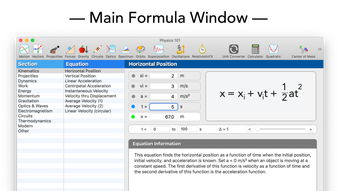
Upon opening Physics 101 SE, you are greeted by the main dashboard. The left sidebar categorizes content into “Fundamentals,” “Intermediate,” and “Advanced.” Selecting a module reveals a brief overview, followed by three tabs: Theory, Simulation, and Practice. The Theory tab contains concise explanations with embedded videos. In the Simulation tab, use the on‑screen controls to adjust variables such as mass, velocity, or charge; real‑time graphs display the resulting motion or field lines.
The Practice tab offers problem sets that draw directly from the simulation’s current state, allowing you to apply what you just observed. Users can save their progress at any point by clicking the “Save Session” button, which creates a cloud‑linked checkpoint that syncs across devices (if you later purchase the iOS companion app). Keyboard shortcuts (e.g., Space to pause, R to reset) speed up navigation, while the Help menu provides searchable tutorials for each feature.
Overall, the workflow is intuitive: choose a concept, explore it visually, test it through problems, and track your mastery—all within a secure, offline‑capable environment.
Compatibility & System Requirements
Physics 101 SE is built exclusively for macOS, supporting versions from macOS 11 (Big Sur) through macOS 15 (Sonoma). The application leverages Apple’s Metal framework for graphics acceleration, ensuring smooth 3D rendering on both Intel‑based and Apple‑silicon (M1, M2, and later) Macs. Minimum hardware specifications include a 1.4 GHz dual‑core processor, 4 GB of RAM, and 500 MB of free disk space for core files plus additional storage for user‑generated reports.
For optimal performance—especially when running multiple simulations simultaneously—Praeter Software recommends at least 8 GB of RAM and a dedicated GPU (or Apple Silicon’s integrated graphics). The software is fully compatible with macOS accessibility features, such as VoiceOver and Dynamic Type, making it an inclusive learning platform. No additional runtimes or third‑party libraries are required; the installer bundles all necessary components, which simplifies deployment in classroom settings or personal devices.
Users on other platforms (Windows, Linux, Android, iOS) can still benefit from Praeter’s upcoming cross‑platform versions, but the current full‑featured release remains macOS‑only, guaranteeing a polished, native experience on Apple hardware.
Pros, Cons, and Frequently Asked Questions
Pros
- Highly interactive 3D simulations that bring abstract physics concepts to life.
- Comprehensive curriculum covering from basics to advanced topics.
- Offline capability ensures uninterrupted study, even without internet.
- Regular, secure updates from Praeter Software keep the content current.
- Built‑in progress tracking and gamified badges motivate continued learning.
Cons
- Available only for macOS, limiting access for Windows or Linux users.
- One‑time purchase price may be a barrier for some students.
- Learning curve for absolute beginners unfamiliar with simulation interfaces.
FAQ
Is Physics 101 SE compatible with Apple Silicon Macs?
Yes, the application runs natively on M1, M2, and later Apple Silicon chips, taking full advantage of the integrated GPU for smooth simulations.
Can I use Physics 101 SE without an internet connection?
Absolutely. After the initial download, all lessons, simulations, and practice problems are stored locally, allowing offline study. Updates require internet, but regular use does not.
What is the licensing model – subscription or one‑time purchase?
Physics 101 SE is sold as a one‑time purchase. The price includes lifetime access to the current version and free updates for the next two years; after that, optional upgrade packages are available.
Does the software provide any teacher tools?
Yes, educators can generate class reports, export student performance data, and assign specific modules or problem sets. A teacher dashboard simplifies monitoring progress across multiple devices.
Is there a trial version before purchasing?
Praeter Software offers a 14‑day free trial with full feature access, allowing prospective users to evaluate the platform before committing to the purchase.
Expert Review
Rating: 4.6/5
Physics 101 SE delivers an exceptionally engaging learning experience for Mac users. Its visual simulations are both accurate and aesthetically pleasing, making complex topics approachable. While the exclusive macOS focus limits audience reach, the depth of content and offline functionality outweigh this drawback for Apple enthusiasts. Overall, it’s a solid investment for anyone serious about mastering physics.
Conclusion & Call to Action
In a world where remote learning and interactive tools are increasingly essential, Physics 101 SE stands out as a secure, feature‑rich, and pedagogically sound application for macOS users. Its blend of high‑quality simulations, comprehensive curriculum, and robust offline capabilities makes it an ideal companion for students, teachers, and curious minds alike. If you’re ready to deepen your understanding of physics while enjoying a seamless, visually captivating experience, click the download button below to start your 14‑day free trial. After the trial, a one‑time purchase unlocks lifelong access to a constantly updated knowledge base. Embrace the laws of nature—download Physics 101 SE today and turn abstract equations into intuitive, hands‑on discoveries.







